I am passionate to take pictures of birds and animals. For this I often like to go to wildlife reserves and zoo. But my every visit to zoo makes me feel bad. I grieved inside while I took these pictures at Jawlakhel zoo.

I am passionate to take pictures of birds and animals. For this I often like to go to wildlife reserves and zoo. But my every visit to zoo makes me feel bad. I grieved inside while I took these pictures at Jawlakhel zoo.

Code:
<style type=”text/css”>
.blur {
color: transparent;
text-shadow: 0 0 5px rgba(0,0,0,0.7);
font-size: 40px;
font-weight:bold;
font-family:Arial, Helvetica, sans-serif;
}
</style>
<div class=”blur”>CSS BLUR EFFECT</div>
One of my favorite keyboard shortcuts in Photoshop and Photoshop Elements are to change blend mode from keyboard. You can cycle through blend modes if you want or to apply specific blend mode directly from keyboard without to click triangle next to drop down list with blend modes each and every time.
How to change layer blend mode
To change layer blend mode in Photoshop and Photoshop Elements you must have active any tool which does not offer blend mode at tool options (just below menus), for example Selection tool (V), Marquee (M), Shape tool (U) and so on.To cycle through blend modes (with layer to which you want to apply blend mode selected on Layers palette) press Shift + (+) to apply next blend mode or Shift + (-) to apply previous blend mode. To apply specific blend mode add and Alt key and press letter, for example to apply Multiply blend mode press Shift + Alt + M, to apply Screen blend mode press Shift + Alt + S, Overlay blend mode is asociated with letter O and Soft Light with F, Color with letter C and Luminosity with Y (Shift + Alt + Y). To go back to Normal blend mode press Shift + Alt + N.

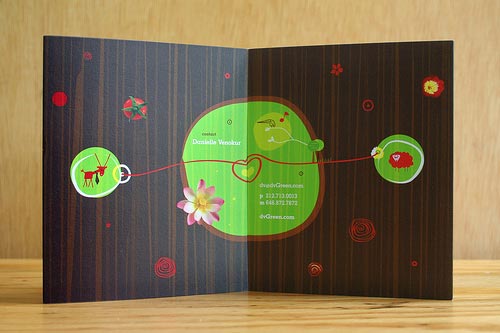
Here is a showcase of 10 Beautiful Brochure Designs for another list of inspiration. In this post you will see some example of a good brochure designs.
Lots of work on office so I don’t have time to design/ write anything. My mind is out of order; it’s time to take a rest. Therefore, I would like to share my some old (before 1month) stuffs. Exactly it’s not my own creativity. I made this from tutorials in Adobe Photoshop CS3.

Cassete
A simple content accordion using the adjacent and general sibling combinator and the :checked pseudo-class.

Screen Print
Today I make a design of pencil in Photoshop CS3. If you want to learn, any comments or feedback feel free to mail me @ bijaya.t.m@gmail.com


